

TL;DR:
- Regular maintenance, including bi-annual cleaning and monthly monitoring checks, is essential for optimal solar system performance.
- Professional inspections and proper troubleshooting help ensure warranty coverage and prevent costly damage or downtime.
Solar panels are designed to be low maintenance, but that doesn’t mean they’re no maintenance. Without a practical solar system maintenance guide to follow, many homeowners discover performance problems months or even years after they started. Dust accumulation, inverter faults, shading from new tree growth, and wiring wear can quietly reduce your output by 10 to 25 percent. This guide walks you through every stage of home solar maintenance: what to do yourself, when to call a professional, and how to use your monitoring data to catch problems before they cost you money.
Table of Contents
- Key takeaways
- Getting ready for solar system maintenance
- How to clean and inspect your solar panels
- Troubleshooting common solar system issues
- Professional maintenance plans and warranty compliance
- Verifying that your maintenance is working
- My take on solar maintenance after years in the field
- Let A&R Solar keep your system performing at its best
- FAQ
Key takeaways
| Point | Details |
|---|---|
| Clean panels twice a year | Bi-annual cleaning maintains optimal efficiency and aligns with most manufacturer guidelines. |
| Use monitoring to trigger maintenance | Performance drops in your monitoring app are a more reliable maintenance signal than the calendar. |
| Know your troubleshooting workflow | Checking your breaker, inverter fault codes, and monitoring status resolves most issues in minutes. |
| Professional plans protect warranties | Manufacturers may request maintenance records before honoring warranty claims. |
| Document everything | Keeping logs of inspections and repairs supports warranty compliance and tracks system health over time. |
Getting ready for solar system maintenance
Before you touch a panel or open an app, preparation makes the difference between a safe and effective maintenance session and one that causes new problems.
Tools and materials to have on hand
You don’t need specialized equipment for basic solar panel upkeep. Here’s what covers most tasks:
- A soft-bristled brush or microfiber squeegee with an extendable handle
- Mild dish soap and a bucket of lukewarm water
- A garden hose with a low-pressure nozzle
- Binoculars for roof-level visual inspections from the ground
- A notepad or phone for logging what you observe
- Access to your system’s monitoring app or web portal
Safety first
Working near your solar array carries real risk. Stay off the roof during wet or windy conditions. Never open your inverter casing or handle DC cables. If you ever detect a burning smell, scorch marks, or visible arc damage near wiring, stop and call a qualified technician immediately. Improper DIY electrical work can be dangerous and may void your warranty.
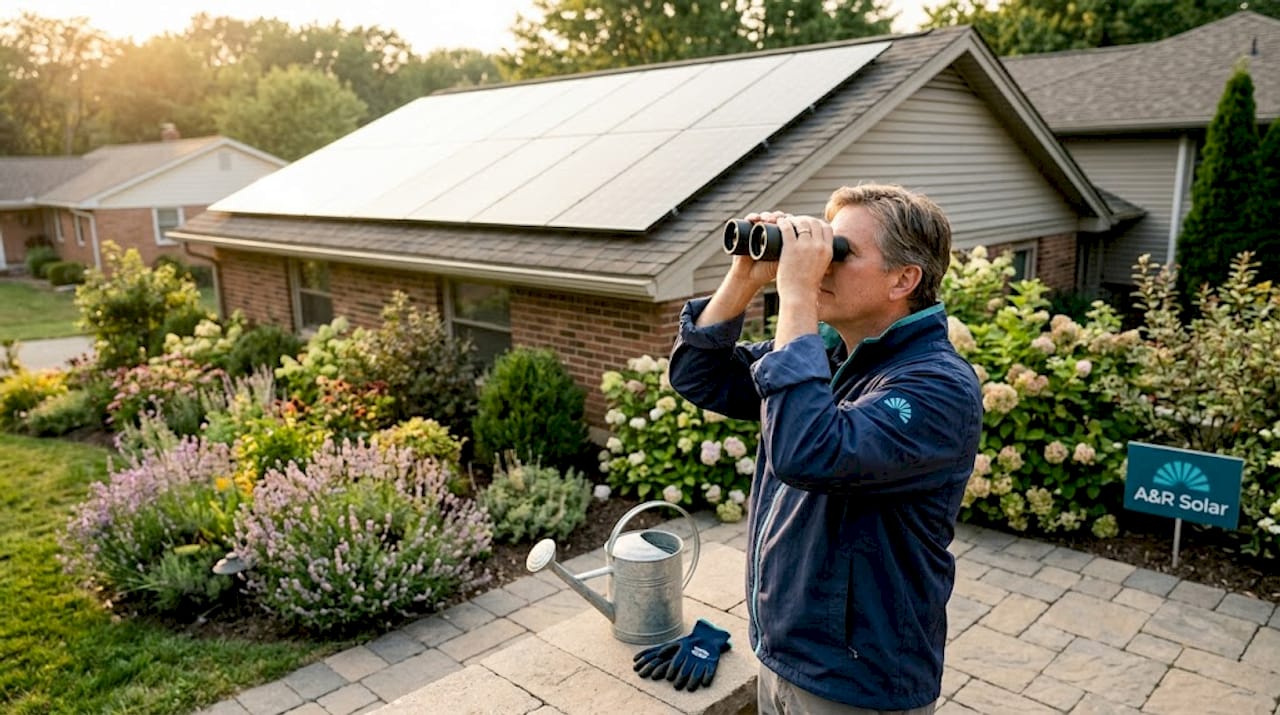
Roof access is the most common point where homeowners get into trouble. Whenever possible, do your visual inspections from the ground using binoculars, or use a drone for a closer look. For anything requiring hands on the roof, consider hiring a professional.
Pro Tip: Set a recurring calendar reminder for maintenance sessions, but also check your monitoring app monthly. Performance-based triggers are more effective than calendar-based scheduling alone, especially for catching problems between scheduled visits.
Maintenance checklist overview
| Task | Frequency | DIY or Pro |
|---|---|---|
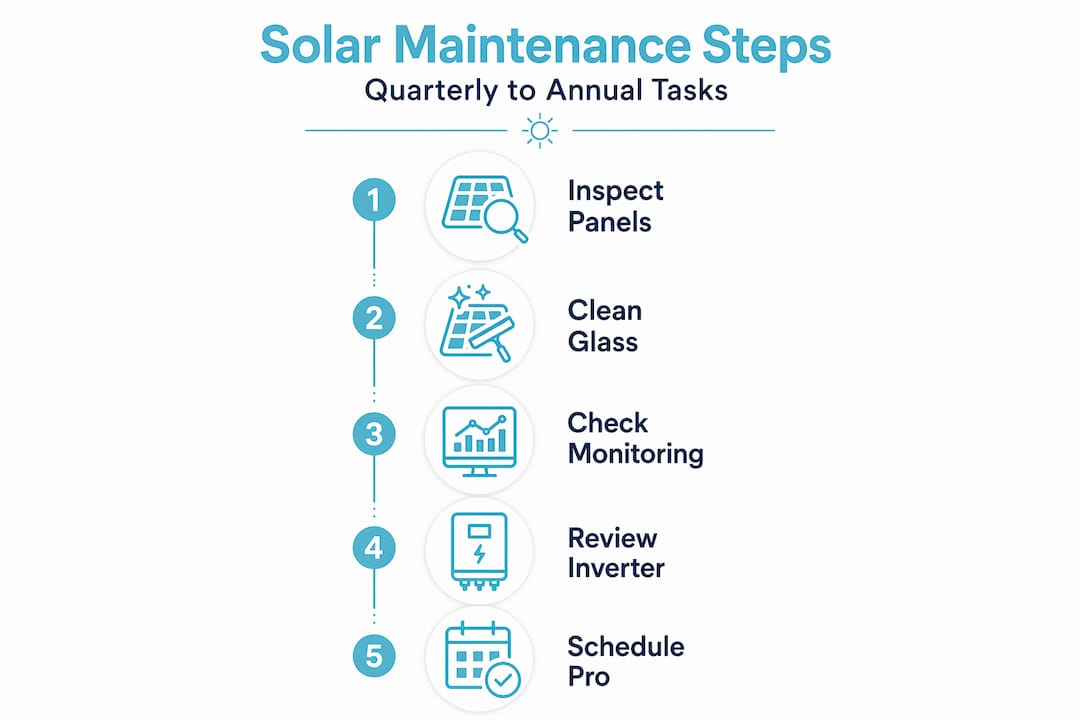
| Visual inspection | Quarterly | DIY |
| Panel cleaning | Every 6 months | DIY or Pro |
| Inverter status check | Monthly | DIY |
| Wiring and mounting inspection | Annually | Pro recommended |
| Full system diagnostic | Annually | Pro |
| Monitoring data review | Monthly | DIY |
How to clean and inspect your solar panels
Routine cleaning keeps your panels producing at their rated capacity. Dirt, bird droppings, pollen, and moss are the most common culprits in the Pacific Northwest. Bi-annual cleaning is the standard recommendation for most residential systems, though homes near agricultural areas or construction sites may need more frequent attention.
Step-by-step cleaning process
- Check your monitoring app before you start. Note your current production baseline so you can compare output after cleaning.
- Choose the right time. Early morning or late evening works best. Cold water on hot panels can cause thermal shock and micro-cracks.
- Rinse the panels gently with a low-pressure hose to remove loose debris.
- Mix a small amount of mild dish soap with lukewarm water. Avoid abrasive cleaners, vinegar solutions at high concentrations, and anything with bleach.
- Use a soft brush or microfiber squeegee to wipe panels in long, straight strokes. Circular scrubbing can leave streaks that affect performance.
- Rinse thoroughly and allow to air dry.
- Log the date and conditions in your maintenance record.
What to look for during visual inspections
Beyond cleaning, quarterly visual checks catch issues before they become expensive. Look for:
- Cracks, chips, or discoloration on panel surfaces
- Bird nests or debris buildup under panels or along mounting rails
- New shading from trees, antennas, or neighboring structures
- Loose or corroded wiring connections visible at the panel edge
- Rust or physical damage to mounting hardware
Pro Tip: If your monitoring data shows a consistent production dip from one string of panels but not another, that’s a strong signal to inspect that specific section for shading or soiling. Linking monitoring signals to your physical checks is far more targeted than inspecting everything at once.
The most common cleaning mistake homeowners make is using a pressure washer. High-pressure water can force moisture beneath panel frames, damage junction boxes, and strip protective coatings. Stick to low pressure and soft materials.
Troubleshooting common solar system issues
A good solar system troubleshooting workflow gets you from “something’s wrong” to “here’s what it is” in under ten minutes. Most residential issues fall into a small set of categories.
The five-minute triage checklist
Work through these steps before calling anyone:
- Check your main breaker and solar isolator switches. A tripped breaker is the most overlooked cause of a system going offline. Reset and observe.
- Look at your inverter display. Inverter faults are the most common reason a system stops producing power. The display will typically show a fault code that your manufacturer’s manual or app can decode.
- Open your monitoring app. Note whether it shows reduced production or shows the system as fully offline.
- Distinguish monitoring faults from generation faults. A system can be producing power normally while the monitoring app shows “offline” due to a communication issue. Restart your monitoring gateway or router before assuming a generation problem.
- Note the timing. Did the issue start after a storm, a grid outage, or a particularly hot day? That context matters when reporting to a technician.
“Never open inverters or handle DC cables yourself. If you see scorch marks or smell burning near your electrical components, shut the system down using your AC isolator and contact a qualified engineer before doing anything else.” — Solar System Not Working
How to document and report issues
When you contact your installer or a service provider, give them this information upfront: the fault code shown on the inverter, the date and time the issue started, recent weather conditions, and screenshots from your monitoring app. This cuts diagnostic time significantly. A well-documented report often means a technician arrives with the right parts already in their van.
Avoid any attempt to open your inverter, splice wiring, or reset components beyond what your system’s user manual explicitly authorizes. Improper DIY electrical work can be dangerous and will almost certainly void active warranties.
One underappreciated risk: if your original installer has closed their business, you may have what some in the industry call an “unattended asset.” A solar firm recently reported servicing over 200 systems left without support after installer closures. Establishing a relationship with an independent service provider before a problem occurs is a sound precaution.
Professional maintenance plans and warranty compliance
DIY care covers a lot, but it doesn’t cover everything. Professional maintenance plans fill the gap, particularly for inverter diagnostics, wiring inspections, and warranty compliance.
What professional plans typically include
Residential maintenance plans generally cost between $99 and $800 per year, with the tier determining what’s included:
| Plan tier | Typical price range | What’s covered |
|---|---|---|
| Basic | $99 to $199/year | Annual system checkup, performance report |
| Standard | $200 to $450/year | Panel cleaning, inverter check, wiring visual |
| Premium | $450 to $800/year | Full diagnostic, inverter servicing, priority response |
Basic plans are suitable for newer systems with active manufacturer warranties and no known issues. Premium plans make more sense for systems over five years old, those with battery storage, or anyone who has experienced recurring faults.
Why professional maintenance protects your warranty
Manufacturers may request maintenance records before honoring warranty claims. Routine professional maintenance creates the documentation trail you need. Professional solar maintenance directly supports warranty eligibility, and skipping it can give manufacturers grounds to deny a claim on a panel or inverter that would otherwise have been covered.
Signs that professional maintenance is overdue:
- Your system is producing noticeably less than it did in the same month last year
- Your inverter shows recurring fault codes even after reset
- You haven’t had a professional inspection in more than two years
- Your system has battery storage that hasn’t been professionally serviced
Professional maintenance plans also create opportunities for proactive diagnosis, identifying parts that are beginning to fail before they take the whole system offline.
Verifying that your maintenance is working
Cleaning and inspecting your system only matters if you track whether it’s making a difference. Your monitoring platform is the primary tool for this.
After each cleaning session, compare your production data from the week before and the week after. A well-maintained system in Washington or Oregon should show production levels consistent with the solar resource for that time of year, accounting for cloud cover. Solar panels degrade at approximately 0.5% to 1% annually, which is normal. A 5 to 10 percent drop from one year to the next is not normal and warrants a professional review.
Keep a simple maintenance log with these fields: date, task performed, observations, and any follow-up actions scheduled. This takes five minutes after each session and creates the documentation your warranty may require.
To extend your system’s lifespan further, follow these practices:
- Keep trees trimmed to prevent new shading and physical debris
- Check mounting hardware annually for corrosion, especially in coastal or high-humidity areas
- Schedule inverter servicing every five to seven years as a baseline
- Use your monitoring app to check solar production monthly, not just when something seems wrong
My take on solar maintenance after years in the field
I’ve talked with hundreds of homeowners who installed solar, celebrated their first year of lower bills, and then largely stopped thinking about their system. That’s understandable. Solar is designed to be hands-off. But the homeowners who get the best long-term performance are the ones who stay mildly engaged, not obsessed, just consistent.
What I’ve found is that the biggest missed opportunity isn’t cleaning. It’s monitoring. Most systems ship with a monitoring app that goes largely unused after the first few months. That app is your early warning system. A small dip in production that persists for three weeks is almost always a sign of something fixable, but by the time a homeowner notices it manually, months of underproduction may have already occurred.
I’ve also seen homeowners assume their system is fine because the inverter has no fault lights showing. A monitoring fault and a generation fault are two different things. Knowing that distinction before you panic or, worse, ignore a real problem, saves time and money.
My honest advice: do your own visual checks and cleaning, use your monitoring app every month, and schedule a professional inspection every two years at minimum. That combination catches the vast majority of issues early, keeps warranties intact, and stretches the life of your system well beyond the 25-year mark that most panels are rated for.
— Shyerome
Let A&R Solar keep your system performing at its best
Your solar system is a long-term asset, and protecting it means having the right support behind you.
A&R Solar offers residential maintenance and repair services designed specifically for homeowners in Washington and Oregon. From annual checkups to full inverter diagnostics and priority service calls, the team handles every tier of care. If you want to see what professional maintenance looks like in practice, the residential project portfolio shows real outcomes from homes similar to yours. Whether your system needs a routine service visit or you’ve inherited an “unattended” system from a closed installer, A&R Solar’s certified technicians can assess your setup and build a plan that fits your system and your budget.
FAQ
How often should I clean my solar panels?
Bi-annual cleaning is the standard recommendation for most residential systems. Homes near heavy pollen, dust, or bird activity may benefit from quarterly cleaning.
What do I do if my solar monitoring app shows the system offline?
Check your internet connection and monitoring gateway first. A system can be generating power normally while the app shows offline due to a communication issue. If the system truly isn’t producing, check your breaker and inverter fault codes.
Do I need professional maintenance to keep my warranty valid?
Yes. Manufacturers may require maintenance records to process warranty claims. Scheduling professional inspections at least every two years creates the documentation trail you may need.
How much does a residential solar maintenance plan cost?
Plans range from $99 to $800 per year depending on the service tier. Basic plans cover annual checkups, while premium plans include panel cleaning, inverter diagnostics, and priority response.
When should I call a professional instead of troubleshooting myself?
Call a professional if you see scorch marks, smell burning, or encounter recurring inverter fault codes that don’t clear after a reset. Never open inverters or handle DC wiring yourself, as this is both dangerous and likely to void your warranty.